Salesforce Community & Social Services Directory for WordPress

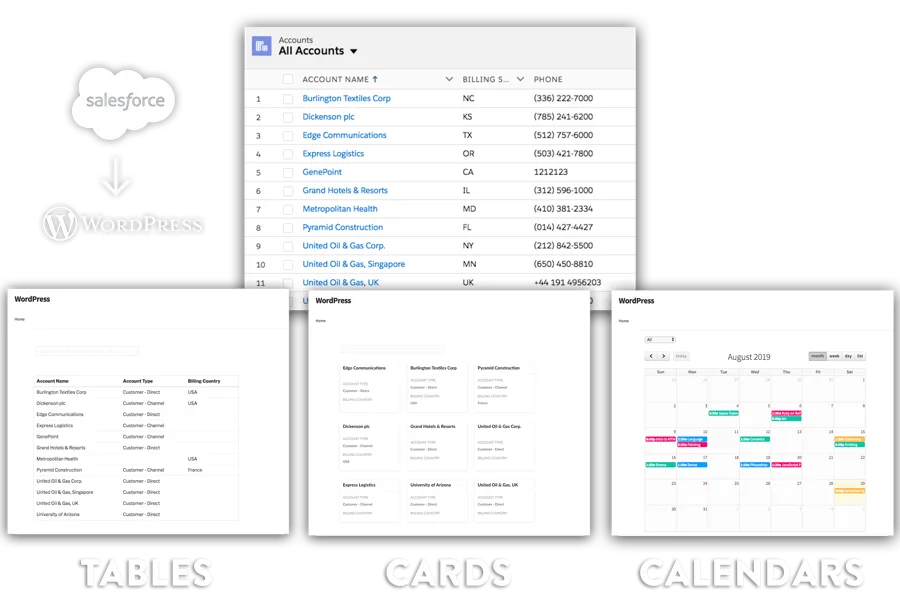
Instantly create list of records from any objects for your Community and Social Services organization. Any changes made in Salesforce show real-time, no sync, no delay. Help people find services, providers, locations, and support resources faster while reducing staff time spent maintaining listings.

  • Any change in Salesforce shows real-time on your WordPress site — no sync, no delay
  • Searchable, filterable Community & Social Services listings your visitors can browse without staff updates
$ 19 /month
Download Now
Salesforce Community & Social Services directory displayed in WordPress using Sawfish plugin

The #1 WordPress Integration for Salesforce

See your Community & Social Services data live in WordPress

Display your records in real-time using searchable tables, calendars, or custom layouts. Users can click any record to view a dedicated page with more info. The plugin automatically adopts your website's theme so colors and fonts always match perfectly. Sawfish plugin also lets you set secure filters to ensure users only see the specific records you want to show.

1. Download Sawfish

Install the Sawfish plugin on your WordPress site.

2. Connect to Salesforce

Create a Salesforce External Client App and authorize via OAuth 2.0.

3. Publish Your Community & Social Services Directory

Add the table shortcode, pick your Community & Social Services fields, and publish. Records update live — no manual refresh needed.

Trusted by 200+ of the world's biggest organizations

Organizations using Sawfish WordPress Salesforce plugin

For community and social services organizations, real-time CRM integration matters because clients, families, referral partners, frontline staff, volunteers, and program leaders all need accurate information about service directories, office hours, provider availability, intake contacts, eligibility rules, location details, and program status information, and when those public directory pages are maintained manually outside Salesforce the website quickly drifts away from the live operational record, which creates stale listings, avoidable follow-up, slower decisions, inconsistent communication across teams, and less confidence from the people who rely on that information to decide what to apply for, who to contact, where to go, what is available, and what action to take next, especially when multiple statuses, owners, deadlines, locations, approvals, and public-facing pages can change across the day and still need to stay aligned for outreach, intake, service delivery, reporting, and follow-through. By pulling those directory pages directly from Salesforce into WordPress, the team saves time otherwise spent maintaining separate resource lists, reconciling spreadsheets from different programs, editing pages every time a service changes, correcting stale contact details, confirming what is still active, and fielding repeat calls caused by outdated listings, and can instead focus on intake coordination, case management, community outreach, referral follow-up, partner communication, compliance reporting, service delivery planning, and the hands-on support work that improves outcomes for people who need help quickly, while keeping the website aligned with the same source of truth the organization already uses every day to run its programs, services, relationships, and internal workflows, reducing duplicate data entry, internal review loops, last-minute corrections, and the constant cleanup work that happens when Salesforce, shared documents, and website content stop matching each other as the organization grows.

Who Benefits from a Live Community & Social Services Directory?

Real-time Salesforce data on your WordPress site saves time for your team and improves the experience for everyone who visits.

For Your Team

Less admin work, more accurate data

  • Create live directories of programs, case workers, service locations, partners, and community resources.
  • Reduce manual maintenance of referral and resource lists by publishing Salesforce data directly to WordPress.
  • Keep public-facing service information accurate across programs, staff, and locations.

For Your Visitors

Find what they need, instantly

  • Find assistance programs, support services, and resource locations.
  • Search providers, case workers, offices, or service categories.
  • Access current information without waiting for staff updates.

Code snippet

Add a Community & Social Services Table with Detail Links

Paste the Sawfish table shortcode on any WordPress page, then add the snippet below to make each row clickable. Visitors open a detail page with the full record — just the fields you choose to show.

Step 1 — Add the table shortcode


[sforc-table sf-o="Service_Location__c"
  fields="Name,Field1__c,Field2__c"
  search="true" per-page="20"]

Replace Field1__c and Field2__c with the API names of the Community & Social Services fields you want to display as columns.

Step 2 — Make rows clickable (optional)

<script type="text/javascript">
window.onload = function() {
  jQuery(document).on('click', '.sforc-row', function() {
    var id = jQuery(this).attr('data-sforclink');
    jQuery("<a href='/detail-page/?sId=" + id + "' target='_blank'></a>")[0].click();
  });
};
</script>

<style>
.sforc-row { cursor: pointer; }
</style>

Clicking a row opens /detail-page/?sId=RECORD_ID in a new tab. Design that page using the Sawfish Section shortcode to display any Community & Social Services fields you want.

The detail page URL looks like this:

https://yoursite.com/detail-page/?sId=0030K00001u7dSNQAY

The record ID is passed as a URL parameter. Use the Sawfish Section shortcode on that page to pull and display any fields from that specific Community & Social Services record — great for linking to individual listings without revealing everything in the table.

See it in action

Real-time Community & Social Services data on WordPress

Every update you make in Salesforce appears immediately. Search, filter, and browse — no sync required.

Who Uses a Salesforce Community & Social Services Directory in WordPress?

Real scenarios where teams publish live Community & Social Services data from Salesforce directly to their WordPress site.

Program Manager

Publish a Live Service Location Finder

Let community members search service offices, intake sites, and resource centers directly from Salesforce — updated automatically when locations change.

Download Now →

Case Manager Team

Surface Provider and Referral Directories

Display case workers, partner organizations, and referral resources tracked in Salesforce so staff and clients always access the latest contact information.

Download Now →

Outreach Coordinator

Replace Manual Resource Lists

Eliminate outdated PDFs and static web pages by publishing Salesforce records as a filterable online directory your visitors can browse by service type or location.

Download Now →

Community & Social Services directories are Just the Beginning

Sawfish sets up a complete Salesforce–WordPress integration

Collect data with forms, display it with tables and cards, lock content behind Salesforce logins, and build charts — all from one plugin.

Tables & Lists
Forms & Submissions
Calendars
Charts & Dashboards
Cards & Layouts
Member Logins

Sawfish gave us the ability to publish all our jobs in Salesforce onto our website in real-time, dramatically increasing the number of job applicants, candidates, and placements with our clients. Upon go-live, we saw immediate traction on published jobs, applications, candidate presentations, and overall job placements. Allen is amazing — very experienced, professional, responsive, and efficient — and the connection works like a charm!

★★★★★
Frankie Farrar-Helm — Western Healthcare

Frankie Farrar-Helm

Director of Marketing
Western Healthcare, LLC

We represent over 75,000 public service workers and care providers in Oregon. Our leadership rosters were manually updated and always out of date. Sawfish plugin makes Salesforce data, like leadership rosters and steward lists, available on our public website. Members can find and contact union representatives without calling the Member Assistance Center.

SEIU Local 503

Sarah Schneider

Service Employees International Union (SEIU) Local 503

★★★★★

Pricing Options — Community & Social Services Directories + more!

Save thousands on development costs — one flat fee for your whole team. Trusted by 200+ organizations.

Annual

$ 19

per month · paid annually

Can be used by everyone in your team!

Create Unlimited pages with Cards, Tables, Calendars using Salesforce data

Custom layouts with images, links, YouTube URLs

WordPress-Salesforce logins for unlimited users

Real-time info from Salesforce

Searchable, filterable directories

Connect to ANY WordPress form

Real-time Charts & Dashboards

Dedicated Support & Installation Assistance

Latest Feature Updates

2-Year Plan

$ 17

per month · paid every 2 years

Can be used by everyone in your team!

Create Unlimited pages with Cards, Tables, Calendars using Salesforce data

Custom layouts with images, links, YouTube URLs

WordPress-Salesforce logins for unlimited users

Real-time info from Salesforce

Searchable, filterable directories

Connect to ANY WordPress form

Real-time Charts & Dashboards

Dedicated Support & Installation Assistance

Latest Feature Updates

Save more time and money
Sawfish vs custom dev vs Salesforce Experience Cloud

Keep your WordPress site, your design, and your team's workflow. No expensive portals or developer contracts.

Sawfish Plugin Custom Dev Experience Cloud Manual Export
Where do directories live? Your WordPress website Custom WordPress build Salesforce-hosted portal Static page / spreadsheet
Real-time data? Yes — live from Salesforce Depends on build Yes No — manual updates
Uses your site's design? Yes — matches your theme Yes (dev required) Separate Salesforce UI N/A
Setup time Under 15 minutes Weeks / months Days to weeks Minutes — but no real-time
Price $19
per month — whole org
$5,000+
one-time dev cost
$25+
/user/month
Free — but costly in staff time

Frequently Asked Questions

Common questions about creating a Salesforce Community & Social Services directory in WordPress.

Can I show multiple Salesforce objects on one WordPress directory page? +

Yes. You can add multiple Sawfish table shortcodes to a single page, each pointing to a different Salesforce object — for example, one table for service locations and another for case workers.

Can visitors filter the directory by service type or region? +

Yes. Any field you include as a column in the shortcode is searchable. Include fields like service category or region so visitors can narrow results quickly.

How do I control which data is shown publicly vs. kept private? +

Sawfish only displays the fields you explicitly add to the shortcode. Sensitive data stays in Salesforce unless you configure it to appear on the page.

How do I add a detail page for each service location? +

Use the row-click snippet in this guide. Each row passes its Salesforce record ID to a detail page URL. Design that page with the Sawfish Section shortcode to display any fields from the record.

Can I restrict the directory to logged-in staff or authenticated users? +

Yes. Sawfish includes WordPress-Salesforce login support. You can make any directory page private and require users to authenticate using Salesforce credentials before viewing it.

Does Sawfish work with all Salesforce editions? +

Sawfish requires API access, available on Enterprise, Unlimited, and Developer editions. It does not work on Contact, Group, or Professional editions. Check our docs to verify your edition →

How much does the Sawfish plugin cost? +

Sawfish is $19/month billed annually — one flat fee covering your entire organization. Unlimited users, unlimited page views, no per-seat pricing. See full pricing →

Publish your Community & Social Services directory on WordPress today.

Real-time data from Salesforce. No coding. No manual updates. Works with any WordPress theme.

Download Now

More Salesforce directory guides

🏥 Healthcare Directory 🏠 Real Estate Directory 💼 Staffing Directory 🏛️ Membership Directory 🎓 Education Directory 🤝 Nonprofit Directory

← Browse all Salesforce WordPress directory guides

← Browse all Salesforce WordPress directory guides