Sawfish Plugin
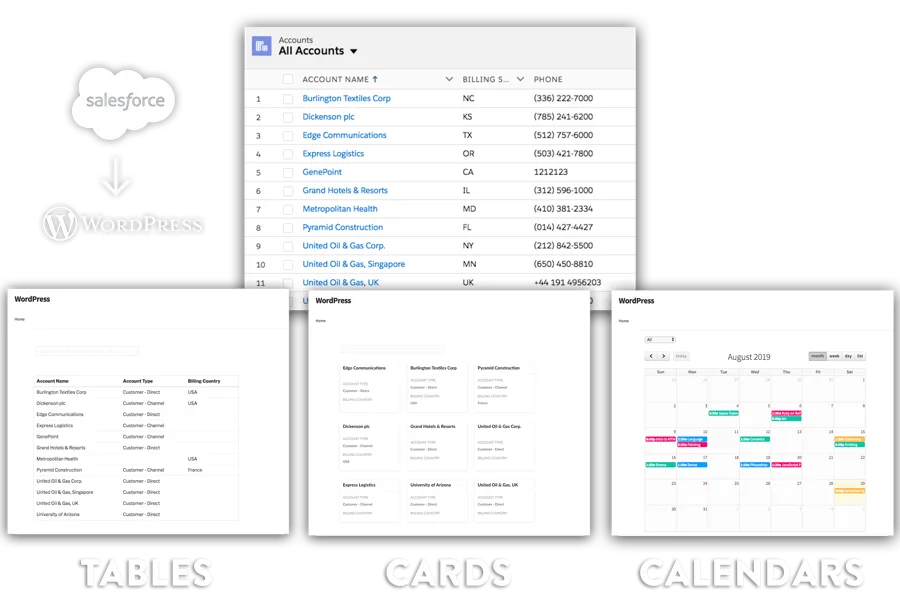
Display any Salesforce object as a searchable, real-time directory on your WordPress site. Tables, calendars, or cards — updated the instant you edit a record in Salesforce. No sync, no custom dev, no iframes.
21 industry guides below ↓
Trusted by 200+ of the world's biggest organisations
Super Simple setup
Download and activate the Sawfish plugin on your WordPress site. No developer needed.
Create a Salesforce External Client App, enable OAuth, and authorise the connection inside WordPress Settings.
Paste the Sawfish table shortcode on any page, set the Salesforce object and field names, and publish. Records update live — no manual refresh needed.
All Industries
Each guide covers the shortcode setup, real-time configuration, and detail page linking for that specific industry and object type.
65 Specific Guides
Each guide is scoped to a specific directory type — provider listings, job boards, event calendars, product tables, and more — pre-mapped to real Salesforce workflows.
How it works under the hood
Add the Sawfish table shortcode to any WordPress page. Set sf-o to the Salesforce object API name, list the fields you want to display, and publish. Sawfish queries Salesforce live on every page load — no middleware, no webhooks, no sync.
Change Contact to any standard or custom Salesforce object API name.
Live preview
Display your records in real-time using searchable tables, calendars, or custom layouts. Users can click any record to view a dedicated page with more info. The plugin automatically adopts your website's theme so colors and fonts always match perfectly.
We have sent you the payment confirmation to your email. We will reach out to you shortly with the installation file of the latest version.
If you would like to receive the download to another id, send us a quick email to
You can also read the installation steps and guide here.
